 Wing FTP Server

 English
 Deutsch
 简体中文
简体中文Just with a few steps you may enjoy writing Lua scripts, follow me:
Step 1: Download the IDE
Here is the download link: https://www.wftpserver.com/bbsres/SciTE.zip
Step 2: Extract and launch
Extract the file "SciTE.zip" into anywhere you like, then launch "SciTE.exe".
Step 3: Configure
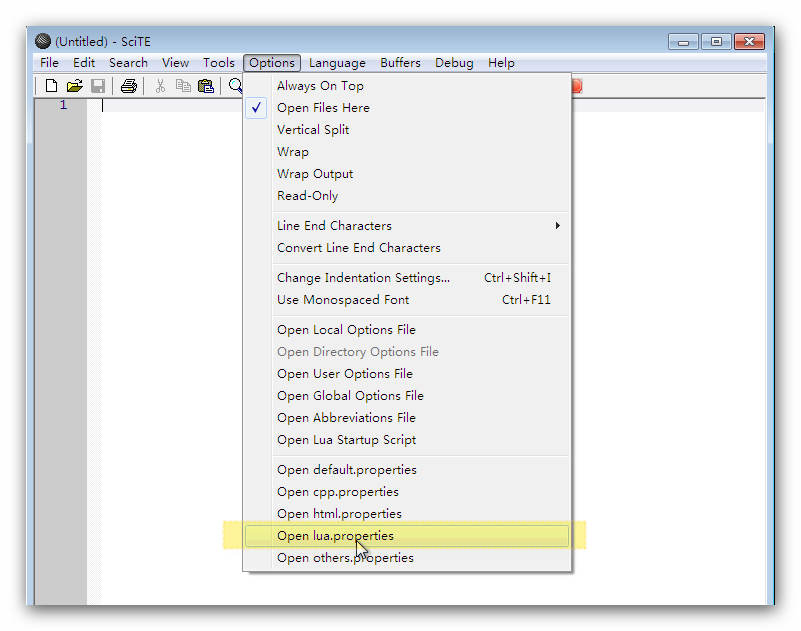
Open the file "lua.properties":
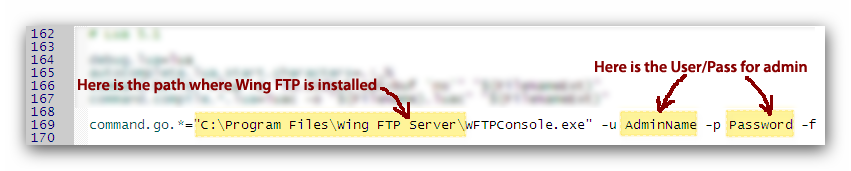
Scroll to bottom, replace the string "AdminName" and "Password" into the real admin account of WingFTP.
Step 4: Edit and run the Lua script
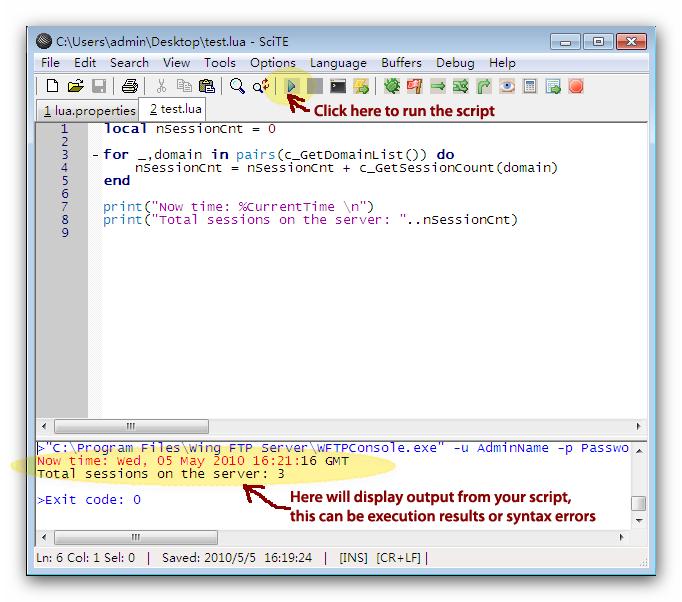
If you want to write Lua script for Event Manager or Task Scheduler, you may write and run it in the IDE first, you can use all the Lua APIs and system variables. When if everything is fine, you may copy and paste the script into WingFTP's Web Administration, that is so easy!