|
Domain Log |
  
|
|
Domain Log |
|
Here you can configure domain log settings.
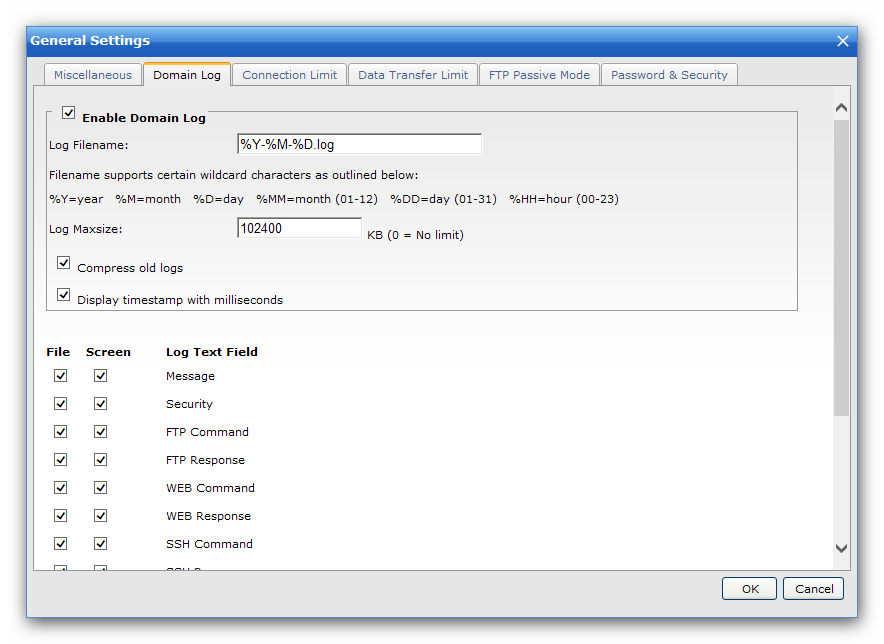
Log Filename
All the domain log files will be stored under the folder "Log/YourDomain", and you can define the custom filename for the log files, you can also use the following wildcard characters for filename:
%Y - Current year
%M - Current month, 1-12
%D - Current day, 1-31
%MM - Current month, 01-12
%DD - Current day, 01-31
%HH - Current hour, 00-23
Log File Permission (Linux)
Default permission for domain log file is "0600". If you want it to be read by other users, you can set it to "0644".
Log Maxsize
The log file will be ignored if it reaches the limit you defined.
Compress old logs
The log of the previous day will be automatically compressed into a zip file for saving the disk space.
Display timestamp with milliseconds
Turn on this option to display timestamp with milliseconds for the domain logs.
File & Screen Logging Options
Choose types of logs to be stored in the log files or to be displayed under "Domain > Logs & Status > Domain Log".